





























Callback Report
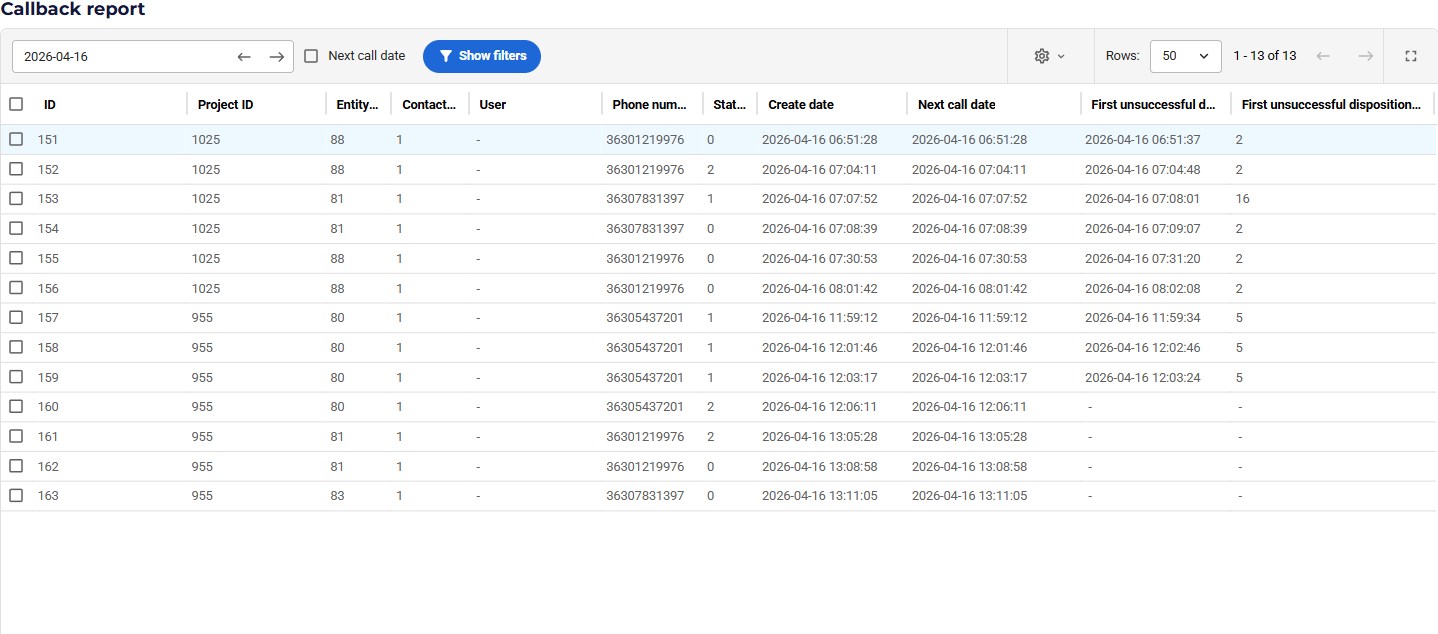
The Callback Report is an analytical tool designed to help supervisors and administrators track the lifecycle of all callbacks generated in VCC Live, including manual callback dispositions or shared callbacks generated due to calls dropped in an inbound queue.
The report is available under the Logs & Statistics menu.
Note: Access to this page requires the Callback report permission to be enabled for your user role.
Filters
You can narrow down the data using the following filters:
- Date Range: Select the period you want to analyze.
- Filter Type: Choose whether to filter by Creation Date (when the callback disposition was set) or Next Call Date (when the callback was scheduled). By default, the report shows today’s callback events.
- Project: Filter by one or multiple projects.
- Phone Number: Search for specific customer numbers.
- User: Filter by the agent who handled the callback attempts.
- Entity ID: Search for specific record identifiers.
The Report Table
The table displays the following key information:
- Record Details: Project Name, Record ID, and Phone Number.
- Timeline:
- Creation Date: The timestamp of the original inbound lost call.
- Next Call Date: The timestamp of the most recent follow-up activity.
- First Failed Recall: If the first attempt to call back the customer failed, the report shows the disposition used, the agent’s name, and the time elapsed (in seconds) since the lost call.
- First Successful Recall: If the customer was successfully reached, the report shows the disposition, the agent’s name, and the time elapsed (in seconds) until this success.
- Status: Indicates the current state of the callback (e.g., Successful, Failed, or Pending/Null).
Comments
Can’t find what you need? Use the comment section below to connect with others, get answers from our experts, or share your ideas with us.
There are no comments yet.