

























Using the Address Book
The Address Book functionality in VCC Live’s contact center solution provides an easy way to upload and call internal and external phone numbers and email addresses. It can help you reduce the time spent frequently calling or emailing your most used contacts. This solution helps you store and easily dial the provided phone numbers without additional work, or select the email addresses of agents.
Table of Contents
Uploading Contacts to the Address Book
The Address Book feature can be found at VCC Live menu > Contact Center > Address Book.
You can add a new record by selecting ‘Add new contact’ in the menu. You need to provide an associated name for the contact, the phone number or the email address itself, and the projects from which it can be reached. You also need to highlight whether the agents can use this phone number when transferring a call and/or making a custom call.
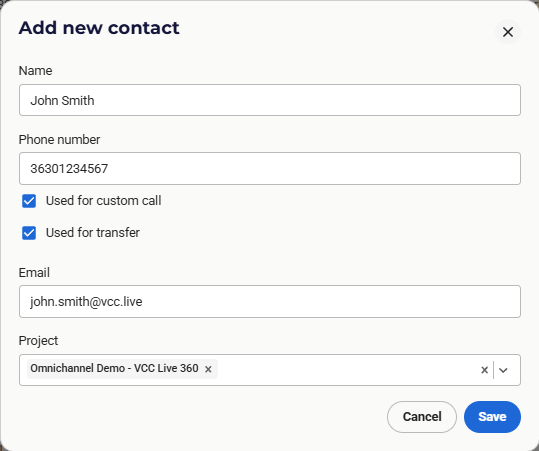
Note: You can add VCC IVR Process IDs as phone numbers by starting them with a sign (e.g., 1234). When the agent transfers a call to this number in the phone book, the call will be transferred to the given IVR process. In this case, only blind transfer is allowed.
After adding contacts, you can check the list of already uploaded contacts and edit them if necessary. You can also search in the address book by typing in the Search field. You can search by name, phone number, email address, or by the name of the project that the contact is assigned to.

Note: The contacts assigned to a project are also assigned to the new project when a project is cloned. By default, a new, non-cloned project has no contacts attached in the address book.
Bulk Upload of Contacts
Bulk import is also possible by selecting the ‘Import contacts’ option. You can upload a CSV file with the following columns as headers: ‘name’, ‘phone’, ‘transfer’, ‘call’, ’email’, ‘project_ids’ (with ‘phone’, ‘transfer’, and ‘call’ mandatory). Uploading a file without these columns will result in an error,
You can upload up to 10,000 records using this functionality, while a maximum of 500 records will be displayed at the same time using the filter.
Using the Address Book
When agents open up VCC Live, they can use the address book (as a new tab at Custom Calls) to look up contacts and initiate calls as a Custom Call. Agents can also look up contacts in the Address Book while transferring calls.
Agents can search for address book records or start calls in all dialing modes (including manual and predictive dialing) and also during breaks.
When working with emails, agents can select contacts from the address book and add them to the emails easily.
Comments
Can’t find what you need? Use the comment section below to connect with others, get answers from our experts, or share your ideas with us.
There are no comments yet.